Guest article
Indoor Golf Simulator Projectors & Room Planning in Dubai
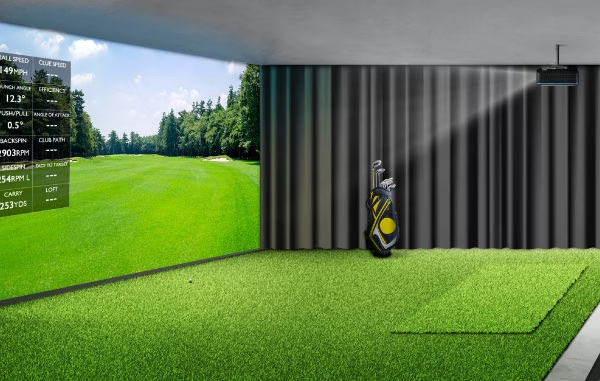
Planning an Indoor Golf Simulator Room During a Villa Renovation in Dubai
An indoor golf simulator can turn an unused room, basement or entertainment area into a dedicated golf practice space. For villa owners in Dubai, incorporating a golf simulator during renovation makes it easier to plan the room dimensions, projector installation, screen structure, electrical points and technology infrastructure before the finishing work is complete.
A modern indoor golf simulator is more than a screen and a projector. It combines launch-monitor technology, golf simulation software, an impact screen, a suitable hitting area and a projection system that displays the virtual golf course. Each component needs to work together to deliver a realistic and enjoyable experience.
Here are some important considerations when planning an indoor golf simulator room during a villa renovation.
Explore our indoor golf simulator solutions, Appotronics professional laser projectors and home cinema and acoustic solutions.
1. Choose the Right Room for an Indoor Golf Simulator
The first step is identifying a suitable space. A spare bedroom, basement, dedicated entertainment room or purpose-built extension may be suitable, depending on the available dimensions.
Room width, length and ceiling height are particularly important. The space must allow comfortable golf swings, safe movement around the hitting area and enough distance between the golfer and the impact screen.
Before renovation begins, consider:
Available room width and ceiling height
Distance between the hitting mat and impact screen
Space for right-handed and left-handed golfers, if required
Position of doors, windows and structural columns
Seating and storage requirements
Ventilation and air-conditioning
Planning these details early helps avoid changes to the room after the flooring, ceiling and interior finishes have been completed.
2. Select a Suitable Golf Simulator Projector
The projector is one of the most important components of an indoor golf simulator. It displays the virtual golf course on the impact screen, allowing players to see the course, ball flight and simulation environment.
However, choosing a projector involves more than looking at its resolution or brightness rating.
The projector should be selected according to the room dimensions, screen size, mounting position, throw distance and ambient lighting conditions.
Important projector considerations include:
Brightness: The required lumen output depends on the screen size and the amount of ambient light in the room.
Resolution: A suitable resolution helps produce clear course details, graphics and simulation visuals.
Throw distance: The projector must be able to fill the screen from its planned mounting position.
Mounting location: Ceiling placement should avoid interfering with the golfer's swing or casting shadows.
Lens and image adjustment: Lens shift, zoom and image geometry features can help with installation flexibility, depending on the projector.
Ventilation: Adequate airflow should be maintained around the projector.
A short-throw projector is often considered for golf simulator rooms because it can be installed closer to the impact screen. The final choice should still be based on the room layout and projector specifications.
3. Understand Brightness and High-Lumen Projectors
Indoor golf simulators often use large impact screens, making projector brightness an important part of the design.
A projector with insufficient brightness may produce a less visible image, particularly in rooms with ambient lighting. On the other hand, choosing an extremely high-lumen projector without considering the screen, lens and room conditions may not deliver the expected result.
Professional laser projectors are worth considering for larger or more demanding projection environments. High-brightness solutions, including Appotronics laser projection technology, can be relevant where the installation requires substantial light output and large-scale visual presentation.
For a golf simulator, the projector should be assessed for compatibility with the screen dimensions, throw ratio, image resolution and intended room lighting. A projector designed for a large auditorium is not automatically the right choice for a residential golf simulator.
4. Plan the Impact Screen and Hitting Area
The impact screen is where the projected golf course appears and where golf balls are safely received after being hit.
It should be selected according to the simulator system, expected usage and room dimensions. The supporting structure must be suitable for repeated ball impact, while the surrounding area should help contain stray shots.
During renovation, plan for:
Impact screen dimensions and mounting structure
Suitable screen clearance and side protection
Golf hitting mat and stance area
Launch-monitor placement
Ball containment and safety
Access for maintenance and replacement
The hitting area and projector position should be coordinated. A poorly positioned projector can create shadows when the golfer stands over the ball or swings.
5. Plan Electrical Points, Data Cabling and Ceiling Mounts
One of the biggest advantages of installing an indoor golf simulator during renovation is the ability to prepare the infrastructure before the room is finished.
The projector may require a dedicated power point near the ceiling. The launch monitor, computer, simulator equipment, display and network devices may also require planned connections.
Consider preparing:
Ceiling power and mounting provisions for the projector
HDMI or other suitable AV signal pathways
Network cabling for connected equipment
Power outlets near the simulator computer and accessories
Cable routes for speakers and displays
Access points for future maintenance
Concealed cable pathways can create a cleaner installation and reduce the need for surface-mounted wiring later.
6. Integrate Audio, Lighting and Climate Control
An indoor golf simulator room can also function as an entertainment space. Audio, lighting and climate control can make the experience more comfortable and convenient.
Lighting should be arranged so that it does not interfere with the projected image. Separate lighting zones can allow the room to be bright enough for practice while maintaining suitable conditions for projection.
Audio systems can provide course sounds, announcements, music and entertainment. Air-conditioning and ventilation should also be considered, particularly in enclosed simulator rooms where people may spend extended periods practising.
Where required, these systems can be integrated with a wider home automation platform.
7. Consider the Right Golf Simulation Technology
The launch monitor and simulator software are central to the golf experience. Depending on the selected system, they can track ball and club data, calculate shot performance and display virtual courses.
The equipment should be chosen based on the intended use of the room. A homeowner interested in casual family entertainment may have different requirements from a golfer who wants detailed practice data.
Before selecting the system, consider:
Ball and club tracking capabilities
Software and course compatibility
Right-handed and left-handed player support
Indoor space requirements
Computer and graphics requirements
Software subscriptions and updates
Future upgrade options
The projector, launch monitor, software and impact screen should be evaluated as one integrated system rather than selected independently.
8. Coordinate the Simulator With the Villa Interior Design
An indoor golf simulator does not need to look like a commercial training facility. It can be designed as part of a villa's entertainment area, with coordinated flooring, wall finishes, acoustic treatment, storage and seating.
Some homeowners may prefer a dedicated golf room, while others may want a multi-purpose space that combines golf simulation, sports viewing and entertainment.
Planning the interior design alongside the AV and simulator installation helps ensure that the equipment, cables, screen and projector are accommodated without compromising the room's appearance or usability.
Final Thoughts
Planning an indoor golf simulator during a villa renovation in Dubai allows homeowners to prepare the space, projection system, impact screen, electrical infrastructure and technology before the finishing work begins.
The right combination of golf simulation technology and projector equipment can create a dedicated indoor practice and entertainment environment. The key is to design the complete system around the room rather than selecting individual components without considering their compatibility.
For homeowners exploring indoor golf simulators, golf simulator projectors and professional laser projection solutions in Dubai and across the UAE, early consultation with an experienced AV integration team can help establish the right technical requirements for the project.
About Abode Automation
Abode Automation provides integrated home automation, indoor golf simulator, home cinema and professional AV solutions for residential and commercial projects across the UAE.